In June 2026, the Medical Devices Template Team released version 1.3.0. This is a minor release, but it brings a meaningful set of enhancements to two of the areas that matter most in a regulated manufacturing environment — electronic Device History Record (eDHR) validation and Continuous Flows. In addition, a new Assemble mode has been introduced and several smaller enhancements were also delivered, addressing recurring requests from implementation projects.
In this post, we’ll walk through the new features and enhancements shipped in 1.3.0, with a closer look at the most impactful ones: eDHR Validation and Sign-Off, Automatic Explicit Add, and a handful of Continuous Flows improvements.
Summary of New Features and Enhancements
The table below summarizes what’s new in Medical Devices Template 1.3.0.
| Feature | Description |
|---|---|
| eDHR Validation and Sign-Off | Automatically associates Materials to a Validation Protocol and generates/attaches Stimulsoft-based reports at configured Steps in the production flow. |
| Automatic Explicit Add | New Manual Assemble mode that pre-selects consumable batches from Consumable Feeds, with or without operator confirmation. |
| Continuous Flows — Rework / Temporary Off-Flow rank re-evaluation | Extends the automatic re-evaluation of Material ranks to standard Rework and Temporary Off-Flow scenarios. |
| Label Reconciliation with Splits & Merges | Supports label verification and reconciliation across a full Continuous Flow material group, not just individual Materials. |
| Skip duplicate Protocol Instance creation on DC Limit Set violation | Prevents multiple Protocol Instances from being opened for the same material group when a Data Collection Limit Set is repeatedly violated. |
The release also includes a number of bug fixes, mostly related to Continuous Flows edge cases (tail termination, merge logic, rank consistency on move-next, and rework counters).
You can find the full list of work items in this minor release in the Release Notes.
eDHR Validation and Sign-Off
Anyone that has worked on a Medical Devices implementation project knows that generating and signing off a Material/Device History Record is a core, non-negotiable requirement. Before this feature, either reports would need to be manually generated and attached as evidence in MES or similar automatic behavior would need to be designed and implemented on a per-project basis.
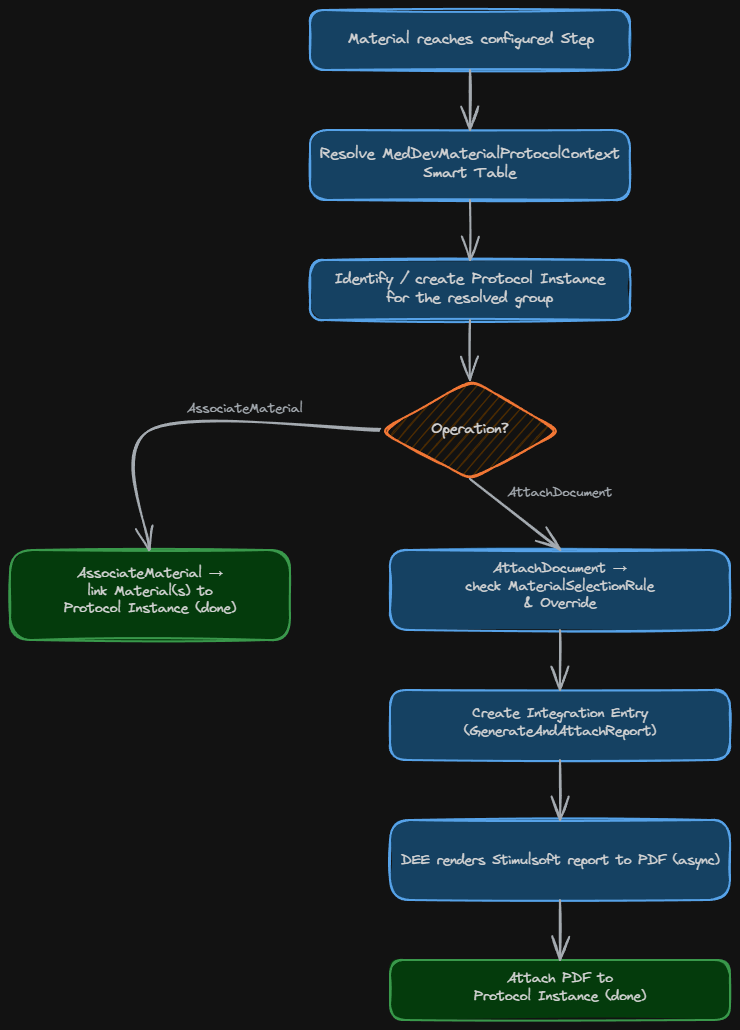
The new eDHR Validation and Sign-Off feature turns this into a template configuration-driven capability. In short, it lets you:
- Associate a Material (or a group of Materials) to a Validation Protocol, automatically, as it reaches a specific Step.
- Generate a Stimulsoft-based report to PDF and attach it to that Protocol Instance, also automatically triggered by the flow.

The association and the report generation don’t have to happen at the same Step. A very common pattern is to associate Materials with a Protocol right at the start of the flow, and only generate/attach the eDHR report at the very end, once all manufacturing data is available. This is all configured in the MedDevMaterialProtocolContext Smart Table (see screenshot above), where you define, per Step:
- Operation — either
AssociateMaterial(just links the Material to the Protocol Instance) orAttachDocument(generates the report and attaches it). - GroupingProperty (or a custom
GroupingRule) — how Materials are grouped into the same Protocol Instance: by Name, Production Order, or Manufacturer Lot Number. The latter is particularly relevant for Continuous Flows scenarios, where validation typically happens at lot level rather than per individual Material. - Report and Report Parameters — which Stimulsoft report to render, and any filter parameters, which can even reference placeholder expressions such as
{{Material.Name}}or{{Material.ManufacturerLotNumber}}to be resolved dynamically at runtime.
{
  "MaterialName": "{{Material.Name}}",
  "LotNumber": "{{Material.ManufacturerLotNumber}}",
  "ProductName": "{{Material.Product.Name}}"
}
Under the hood, report generation is asynchronous: an Integration Entry of type GenerateAndAttachReport is created, and a DEE Rule takes care of rendering the report and attaching the resulting PDF to the Protocol Instance.
A couple of details worth highlighting:
- The
MaterialSelectionRulecolumn lets you filter which Materials in a group actually trigger report generation — for example, only the Tail material in a Continuous Flow lot, using the out-of-the-boxMedDevCheckSourceMaterialIsTailMaterialrule, avoiding unnecessary report generations for every Material in the group. Since this is a Rule, you can also implement your own custom logic if needed. - The
Overrideflag controls whether a newly generated report replaces an existing attachment for the same report path, or whether generation is simply skipped if one already exists. - If needed,
ValidateReplicationcan be enabled to ensure the report is only generated once the material’s last Service History ID (SHID) has been replicated to the ODS — useful when the report relies on OData/ODS-backed data.
To conclude this topic, the next version will include a on-demand report regeneration feature, directly from the Protocol Instance page. If a report needs to be reissued — say, after a data correction — an authorized user will be able to trigger a new generation for any previously attached report, without needing to reprocess the entire flow.
Automatic Explicit Add
An operator manually picking source Materials for an manual Assemble operation is repetitive, error-prone, and adds unnecessary time to an operation that, in most cases, follows a predictable FIFO pattern from a set of consumable feeders. While automatic consumption could be used in most cases, for Explicit Add scenarios the operator still needs to manually select the source Materials, which is not ideal.
Automatic Explicit Add is a new feature that combines the benefits of semi-automatic consumption with the flexibility of manual selection. When a Material sits at a Step with an Explicit Add BOM, the operator can trigger a new Automatic Explicit Add wizard instead of the standard Assemble flow. The system calculates the consumption plan in the backend, resolving, for each BOM Product, which Materials from the Resource’s Consumable Feeds should be consumed — following FIFO order — until the required quantity is fulfilled. In a real scenario, this means the operator can attach the consumable materials to the feeders during Resource Setup; the system will then automatically select the right batches for consumption, without the operator needing to manually pick them.
The wizard exposes a single new flag: Skip Confirmation.
- With Confirmation (OFF) — the system calculates the plan and presents it in the standard BOM confirmation step, so the operator can review the selected source Materials and quantities before confirming.
- Without Confirmation (ON) — the confirmation step is skipped entirely, and the standard
AssembleMaterialservice is called directly with the computed plan.
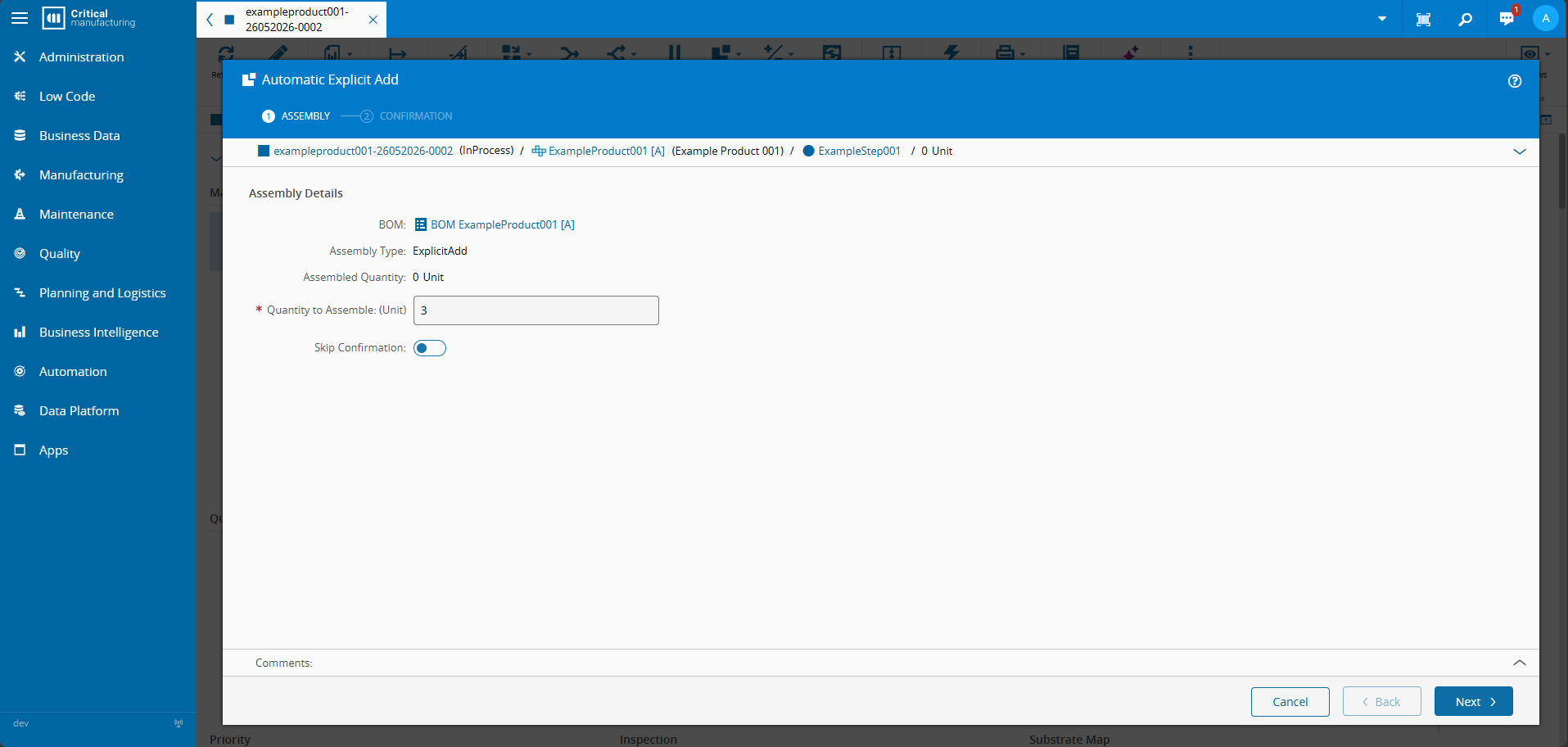
The following list summarizes the backend steps that happen when an operator opens the Automatic Explicit Add wizard:
1. Resolve Material + processing Resource
2. Load current BOM, determine eligible BOM Products
3. Calculate required quantity per BOM Product
4. Resolve Consumable Feeds from the Resource
5. Read queued Materials in the Consumable Feeds
6. Apply FIFO consumption planning
7. Confirm (or auto-call AssembleMaterial)
One consumption detail worth calling out: if the first available Material in a feed doesn’t have enough quantity to fulfill a BOM Product’s requirement, the system doesn’t stop there — it continues consuming subsequent Materials of the same Product, in FIFO order, until the quantity is met (i.e., Multi-Material Consumption). And if, at any point, the available quantity across the feed is simply not enough, the operation is blocked entirely — regardless of the confirmation mode — with a clear message indicating which BOM Product(s) are short.
ℹ️ Skip Confirmation default value
The default behavior of the Skip Confirmation flag can be set per project through the standardGUIElementDefaultValuetable (Context = MedDev.AutomaticExplicitAdd,Element = ShowConfirmation).
Other Enhancements
Alongside the two headline features, 1.3.0 delivers more targeted improvements, mostly around Continuous Flows and Data Collection handling.
Rework / Temporary Off-Flow in Continuous Flows
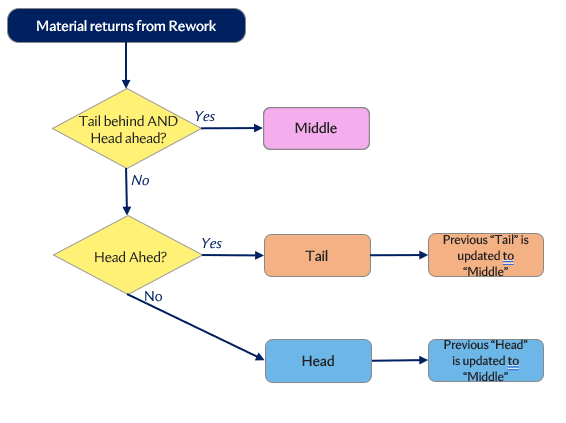
Continuous Flows already supported automatic re-evaluation of Material ranks (Head, Middle, Tail) as chunks move through the flow. In 1.3.0, this re-evaluation logic is extended to cover Materials that temporarily leave the main flow through Rework or a Temporary Off-Flow path.
While a Material is out of the main flow, it’s assigned a dedicated InRework rank. When it returns, MES determines its new rank — Head, Middle, or Tail — based on its position relative to the remaining Materials still in the flow, following the same logic already used for regular flow progression. This means Continuous Flow processes that rely on Rework or Off-Flow paths no longer need custom logic to keep material ranks consistent after a return.
The following diagram shows the implemented rank re-evaluation logic for a Continuous Flow lot returning from a Rework path.
Label Reconciliation with Splits & Merges
The Label Reconciliation feature — which tracks printed labels through verification and final reconciliation — now works properly with Continuous Flow’s Splits & Merges. Previously, verification counts (good, scrapped, first/last label checks) were only tracked at the individual Material level, which didn’t map well to a Continuous Flow scenario where a lot is split into multiple parallel chunks.
With this enhancement, printed label counts are recorded and reconciled against the Main Material of the Continuous Flow group, regardless of which specific chunk triggered the print or the verification step. When a Protocol Instance is opened for label verification (manually, or automatically due to a violation), all active Materials sharing the same Manufacturer Lot Number are automatically associated with it — keeping the full lot in sync for sign-off purposes.
Skip Duplicate Protocol Instance Creation on DC Limit Set Violation
A smaller, but very practical fix for a common pain point: when a Data Collection Limit Set is violated repeatedly for the same Material group, the system used to open a new Protocol Instance on every violation. In regulated environments this quickly becomes noisy — multiple open Protocol Instances for what is essentially the same underlying non-compliance.
1.3.0 introduces the MedDevIgnoreInstanceCreationIfAlreadyAssigned Protocol attribute. When enabled, if the violating Material (or, for Continuous Flows, its group) is already associated with an open instance of the same Protocol, the system suppresses the automatic creation of a new Protocol Instance and simply keeps the violation tied to the existing one.
Wrap Up
Version 1.3.0 continues the trend we’ve seen in recent Medical Devices Template releases: closing the gap between generic MES capabilities and the very specific compliance and traceability needs of medical device manufacturing, particularly around Continuous Flows and eDHR/Report Validation.
Feel free to reach out to the Medical Template Team with questions or feedback on any of these features!
Public Documentation
- Feature Guide — eDHR Validation and Sign-off
- Feature Guide — Automatic Explicit Add
- Feature Guide — Continuous Flows (updated)
- Feature Guide — Label Reconciliation (updated)
- Information Center — Release Notes + Sample Master Data
Author
Hi! My name is Ricardo Cunha. ✌️
I joined Critical Manufacturing back in 2013. I started my journey as a Software Engineer, progressed to Tech Lead, and currently serve as Engineering Lead in the Medical/Life Sciences segment in Solutions Delivery area, as well as Team Lead for the Medical/Life Sciences template team.
You can check me on LinkedIn