“Another JavaScript framework? God, why did I choose this field?”
If you have been working with software for a significant number of years, you probably have heard or even asked yourself the exact same question. But for about two years now, all the talk has been related to Large Language Models (LLM). And if we thought new JavaScript frameworks were popping out like mushrooms, then compared to the latest updates in the AI/LLM world, it was no big deal after all…
Introduction
For decades, the developer experience has been about mastering tools: IDEs, debuggers, compilers, version control. You learned the tool, and the tool did exactly what you told it to. AI and LLMs are changing the contract. The new generation of tools doesn’t just execute instructions — they understand them.
Although models like Claude, GPT or Gemini bring the ability to reason over natural language, explain complex systems and generate meaningful content, the truth is LLMs have real limitations: these models have been trained up to a certain point in time, meaning they have a fixed knowledge cut-off. They have no knowledge of current events or inherent access to your codebase. The models themselves have no idea of what the current weather is in Porto or the world’s current geopolitical… situation.
But over the last couple of years, the industry has converged on a set of patterns and protocols that let you extend what an LLM knows and can do. It’s no longer a smart auto-complete / summarization tool - it’s an active collaborator in your workflow.
Extending LLMs
So what are these patterns and tools that can be used to extend the context provided to LLMs? The following image provides a summary of the different layers that compose the extensibility ecosystem of an LLM.
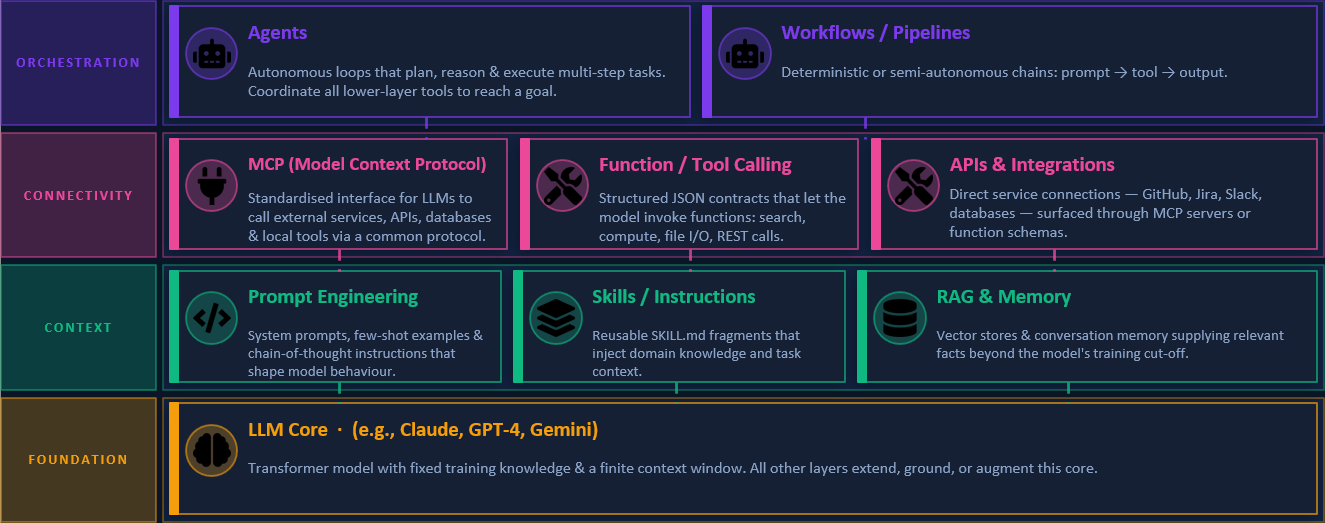
At the foundation layer, you have the LLM itself — a transformer model with powerful reasoning but bounded knowledge.
At the context layer, you shape what the model knows and how to behave. This includes:
- Prompt Engineering: Crafting prompts in a way that guides the LLM to produce the desired output.
- Skills: Pre-built/packaged functionalities that can be invoked by the LLM to perform specific tasks. They are not bounded only by instructions, but can even execute scripts/code.
- Retrieval Augmented Generation (RAG): A technique that allows LLMs to access external knowledge bases or documents to provide more accurate responses.
At the connectivity layer, you have tools that enable the LLM to interact with external systems and APIs. Here the buzz has been around Model Context Protocols (MCP), a standardized way for LLMs to access and interact with external data sources. MCPs allow LLMs to fetch real-time data, query databases, or even interact with other APIs, effectively bridging the gap between the model’s static knowledge and the dynamic world.
Finally, at the orchestration layer, where agents and workflows come into play. Agents are autonomous entities that can perform tasks on behalf of the user, while workflows allow you to define complex sequences of actions that can be executed by the LLM and its connected tools.
Developer Experience in Critical Manufacturing
Now the question becomes: how can we leverage these tools to enhance the developer experience in Critical Manufacturing?
As a first experience, I have explored three different use cases:
➡️ Boilerplate code generation
➡️ Unit tests generation
➡️ Code Reviews
Boilerplate Code Generation
Whenever a new DEE action or custom service needs to be created, the usual approach is to copy code from existing ones and adapt it (change action/service names, change input & output classes, etc.). Especially for new services, this is boring and slightly time-consuming. Another challenge is ensuring that the LLM has the necessary context to generate code that is consistent with the existing codebase. How can we do that?
For this, a new skill was created that instructs the LLM on what to do when asked to generate boilerplate code. The skill provides the LLM with a template of the code structure for each scenario (DEE action or custom service), along with guidelines on how to fill in the blanks based on the provided specifications. The skill also includes examples of well-structured code snippets to serve as references for the LLM.
ℹ️ How to create new skills?
Skills can be created in your repository, by creating a new folder and a SKILL.md file with the instructions. If you’re using Visual Studio Code, you can check in the Settings the available Agent Skills Locations, or add new ones.
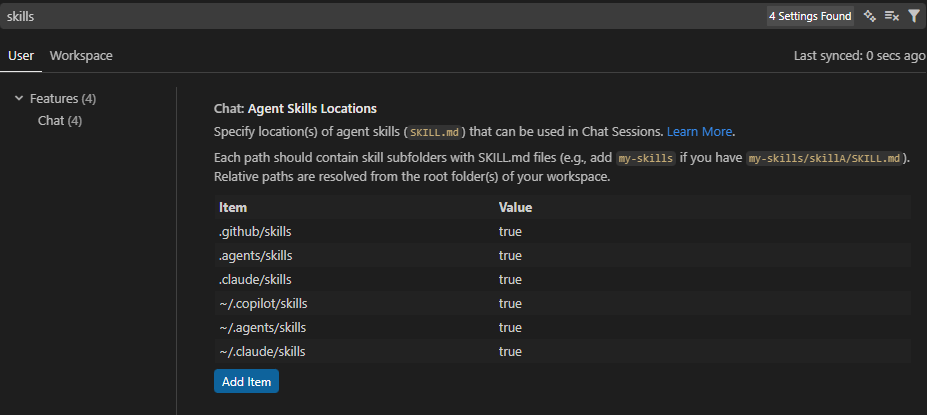
As mentioned before, the instructions are specified in a markdown file that is passed as context to the model. You can find an example of the instructions provided in the Boilerplate Code Skill created for this use case.
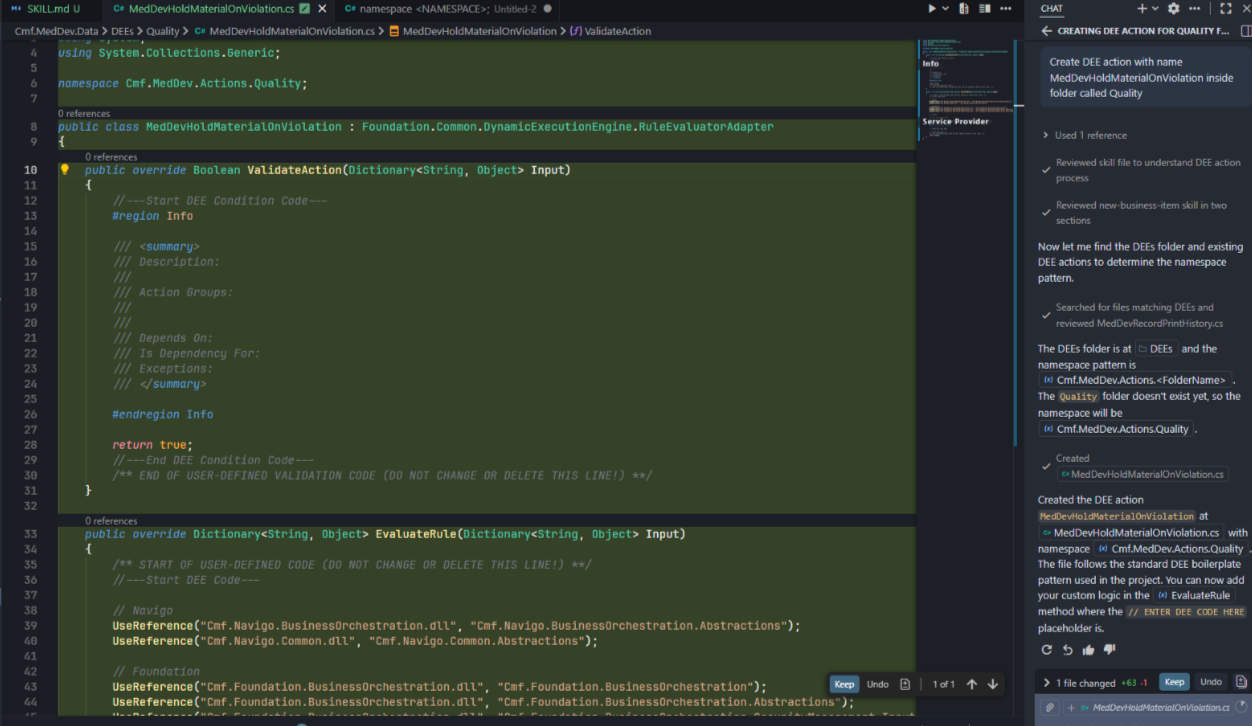
Here is the code generated for a potential new DEE action. VS Code Chat was able to understand with just natural language what I wanted to achieve ("create a new DEE Action (…)") and automatically used the skill to get the instructions.
ℹ️ Code generation for other layers
During this experience, a skill focused on GUI components (widgets, wizards, etc.) was created. However, there are already some commands to generate this boilerplate so the advantage of using an LLM for this is not as visible. For GUI components, the commands are usually faster.
Unit Tests Generation
Unit tests are a critical part of software development, but they can be time-consuming to write. By leveraging LLMs, we can automate the generation of unit tests based on the existing codebase and the specifications provided by the developer. In this use case, the approach followed was different. I selected an existing project that had no unit tests and no skill or agent was created.
1️⃣ A set of unit tests were manually created for a sample DEE action, covering the most common scenarios and edge cases.
2️⃣ The generated unit tests were then used as a reference for the LLM to generate additional unit tests for other DEE actions in the same project - this was explicit in the prompt.
There were some observations on the subsequent attempts to generate unit tests with the LLM:
- The LLM was able to generate unit tests that were consistent with the style and structure of the manually created ones and it was able to generate tests covering approximately 100% of DEE code.
- Without being explicit in the prompt, the LLM typically generated different unit test methods for each test combination instead of trying to reuse and parameterize them (i.e, xUnit’s Facts and Theories).
- When generating tests for a new DEE that had different Input “types” (i.e., an orchestration Input/Output class), the LLM struggled to understand how to generate the unit tests. Eventually, I cancelled the execution.
The last point touches on an important aspect of this whole experience: the LLM’s ability to understand the context of the entire codebase. In this case, the LLM had no prior knowledge of the CM internal framework’s patterns and structures, which made it difficult for it to generate accurate unit tests for new scenarios. Nevertheless, in most cases the LLM was able to assist in the generation of unit tests. In a particular scenario, with a DEE whose structure was similar to a previous one, it took less than 5 minutes to generate, review and commit the code to the repository.
⚠️ A note on code generation
Always review and adapt the generated code, if necessary! Keep vibe coding for personal projects and prototypes, not for enterprise-grade production code. The ones that need to maintain the codebase in just a couple of years will really appreciate it…
Code Reviews
I was quite happy with the previous experiences but I wanted to go even further. What about code reviews? Can LLMs be used to assist in code reviews and provide feedback on code quality, potential bugs, or adherence to coding standards?
For this use case, instead of a skill, an agent was created that could analyze code changes from a particular feature branch. I focused the code review on C#/.NET projects in the repository. The agent’s workflow in itself was simple:
- Calculate the diff of the feature branch with the main/development branch.
- For each changed file, review the code for naming conventions, potential bugs, performance improvements, etc.
- Provide a summary of the review, by categorizing each finding with a severity level (e.g., 🔴 CRITICAL, 🟠 HIGH, 🟡MEDIUM, etc. )
While C#/.NET best practices are quite well-known and documented, the challenge was to provide the LLM with enough context to understand the specific coding standards and patterns used in the CM codebase. For this, the instructions for the agent also included examples of typical issues found in code reviews: loading large object graphs into memory (the levelsToLoad issue 😖), loading inside loops, etc.
For a first approach, I was quite happy with the results. I tested with a real feature branch and the agent was able to identify a critical bug in the logic, which would lead to the feature being completely broken.
However, a couple of observations were made:
- The generated report, although very complete, was too verbose and not easy to read.
- The agent definition .md file already had more than 500 lines.
The first point is something that can always be improved by providing better instructions to the agent on how to summarize the findings and how to present them in a more concise way. For the second one, I decided to test a multiple sub-agent approach: one agent acted as the orchestrator, while multiple child agents were responsible for reviewing specific aspects of the code.
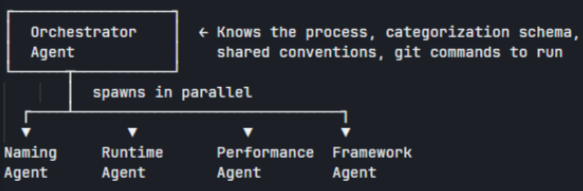
Using this approach, we can select the orchestrator agent in the context window and just ask it to review the code. The orchestrator will then delegate the review to the different sub-agents and aggregate the results in a final report.
Nevertheless, there were some challenges with this approach, especially regarding the conflicts of some findings. The runtime sub-agent, responsible for looking into possible null reference exceptions, might point to potential issues which are in conflict with some assumptions made by the CM framework sub-agent. For example, the ServiceProvider must always be an Input in the DEE Actions. The runtime sub-agent might point to potential null reference exceptions related to the ServiceProvider, while the CM framework sub-agent might not consider it as an issue since it’s a known pattern in the codebase. This led to some confusion, and a new instruction was added to the orchestrator agent to prioritize the findings of the CM framework sub-agent.
Here is an example of the generated report for a particular feature branch:
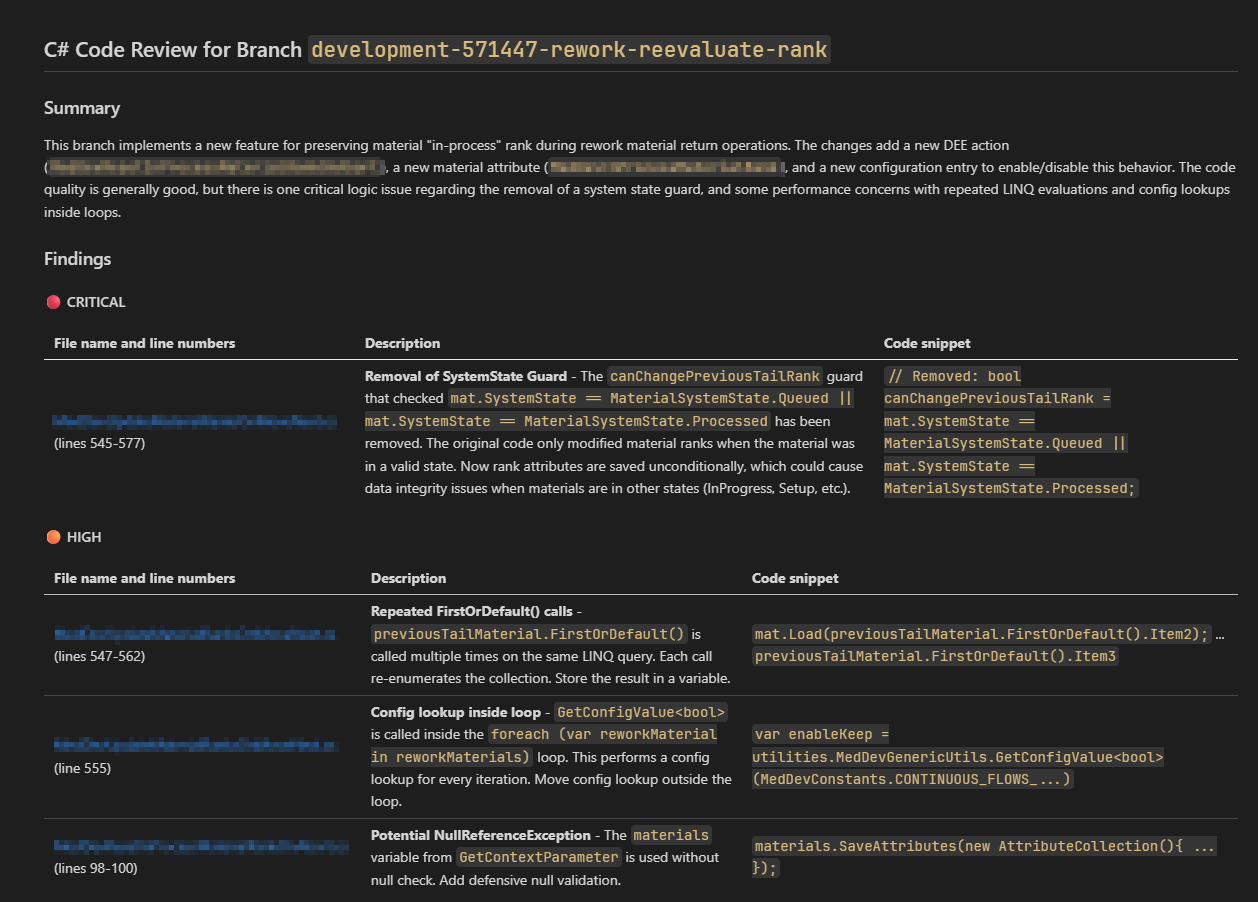
The Critical finding was actually part of the change request, so the fact that the model does not have the full context makes it appear as a critical issue when it is not. Be on the look out for false positives. 👀
Conclusion
The goal of this experiment was to play around with the different tools and patterns available to extend LLMs and see how they can be applied to enhance the developer experience in Critical Manufacturing. The results showed some potential benefits in terms of productivity and code quality, but also highlighted some challenges that would need to be addressed. In addition, another question is how to integrate these tools into the existing development workflow. Can code reviews be fully automated and part of the pull request pipelines? Can unit test generation be triggered by specific commits or branches? These are questions that we will need to explore in the future.
Resources
You can download the (current) final version of the skills and agents used in this blog post here.
Author
Hi! My name is Ricardo Cunha. ✌️
I joined Critical Manufacturing back in 2013. I started my journey as a Software Engineer, progressed to Tech Lead, and currently serve as Engineering Lead in the Medical/Life Sciences segment in Solutions Delivery area, as well as Team Lead for the Medical/Life Sciences template team.
You can check me on LinkedIn