Conceptually, the process of making a coffee can be modeled just like any other shop‑floor operation. You could have the material consumptions, a report production and even equipment availability. In practice, it behaves exactly like a standard manufacturing process scaled down to something as familiar as preparing a cup of coffee.
If the coffee machine has IoT capabilities, you can go even further. The entire lifecycle of the coffee cup can be fully integrated into Critical Manufacturing MES, from material consumption to machine events, creating a complete digital thread for your morning espresso.
A recent international industrial exposition (Hannover Messe), where CM will participate with a booth, provided the perfect opportunity to revisit this project, upgrade it to Version 11 of MES and demonstrate how far this simple idea can go.
The original sin
Let me start from the beginning. A few years ago the ConnectIoT team was challenged to integrate a Nespresso machine with MES in version 6. At that time, the only information available was that the equipment communicated via the BLE protocol and through the official mobile application, the machine could be instructed to brew coffee and several relevant information could be retrieved too.
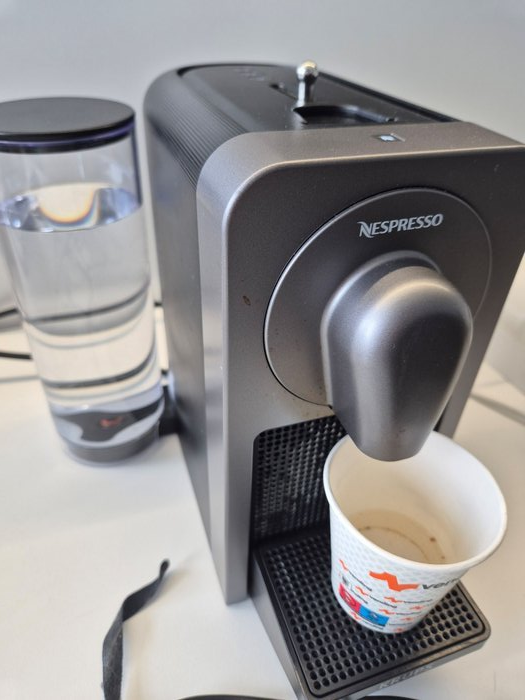
After extensive investigation, using not always “official” tools and methods — we were able to extract all the necessary information to enable full integration.
For the specific Nespresso model used in this Proof of Concept, the following parameters are required to configure the BLE communication protocol:
| Property | Value |
|---|---|
| Mac Address | F8:BA:11:2E:9F:70 |
| BLE Device ID | f8ba112e9f70 |
| BLE Device Name | Prodigio_F8BA112E9F70 |
In the BLE protocol, data points of the equipment are exposed as BLE Characteristics. The Nespresso machine is no different:
| Name | Description | Characteristic UUID | Type | Writable | Readable |
|---|---|---|---|---|---|
| TxLevel | TX Level to start communication | 06aa3a61f22a11e39daa0002a5d5c51b | String | True | True |
| ClubIdMember | Code to authorize communication | 06aa3a41f22a11e39daa0002a5d5c51b | String | True | False |
| MachineSpecificParameters | State of top slider | 06aa3a22f22a11e39daa0002a5d5c51b | Integer | False | True |
| MachineStatus | Status of the Machine | 06aa3a12f22a11e39daa0002a5d5c51b | String | False | True |
| CapsuleStock | Number of capsules stored | 06aa3a15f22a11e39daa0002a5d5c51b | Integer | True | True |
| Command | Command to brew coffee | 06aa3a42f22a11e39daa0002a5d5c51b | String | True | True |
| CommandResponse | Command response | 06aa3a52f22a11e39daa0002a5d5c51b | String | False | True |
Likely in other protocol, the Events are a key element in the communication with the equipment. An Event is triggered when something changes in the machine, in our case we need:
| Name | Description | BLE Characteristic |
|---|---|---|
| OnSliderStateChange | Triggered when the Slider is manually handled | MachineSpecificParameters |
| OnMachineStatusChange | Triggered when the machine status changes (water level, state, etc.) | MachineStatus |
| OnCapsuleStockChange | Triggered when a capsule drops inside the machine after processing | CapsuleStock |
| OnCommandResponseChange | Triggered when a coffee brew command is invoked with the reply | CommandResponse |
In MES, the driver used to integrate the Nespresso machine looked like this:
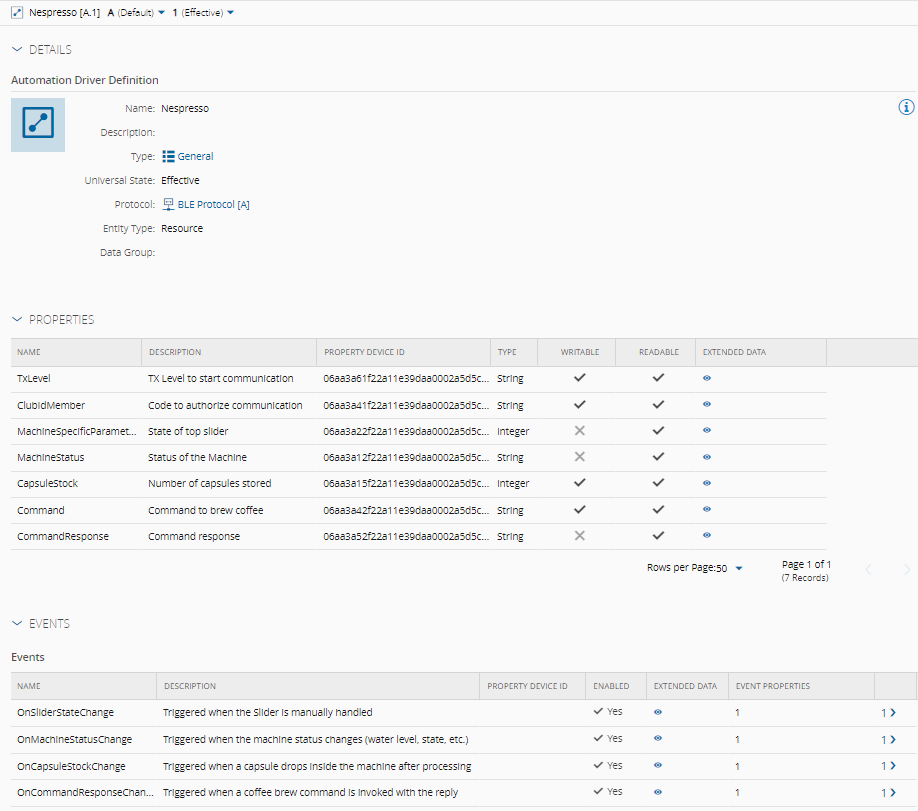
If you want a deeper understanding of how the Nespresso machine works and the reverse‑engineering techniques involved, consult the documentation below. These resources provide additional insights and practical examples how similar process were carried out:
- https://github.com/brandtoliver/brew-api
- https://gist.github.com/farminf/94f681eaca2760212f457ac59da99f23
Modelling
The modelling itself can be as simple as brew me a coffee with a button click or as sophisticated and complex as you want. A more robust modelling could allow the measuring of water and energy in each of the brews using for example BOMs and Consumable Feeds. Nevertheless, by default MES gives you the daily production of coffee by type with just the TrackIn/Trackout logic and the timeline of production/standby from the resource state, or even the OEE. But let’s not overcomplicate things.
The intention is to demonstrate how this type of integration can be achieved, focusing primarily on the ConnectIoT perspective. Once the communication layer is in place, the possibilities for building visually appealing dashboards, feature‑rich functionalities or technically challenging scenarios are virtually endless.
A flow with two steps allows the Nespresso to be fully integrated in the MES logic. A set of Coffee Materials, based in the CoffeeCapsule Product, is created in the step Nespresso with state Queued whenever a new box of capsules is put at the disposal of the machine. When the machine starts brewing the material coffee is Dispatched and TrackedIn and stays in process till the machine informs MES that the brew is finished. Considering the brew selected the Material Type changes to (Lungo, Espresso or Ristretto). Then a Trackout and MoveNext sends the material to the next step - The Trash. Additionally, the machine informs us of the water consumed during the process and, considering the quantity last refilled, allows us to calculate the Water Level by taking into consideration what each brew level takes and the full tank capacity (750ml):
- Lungo - 110ml
- Espresso - 40ml
- Ristretto - 25ml
Controller Workflows
Setup and initial configurations
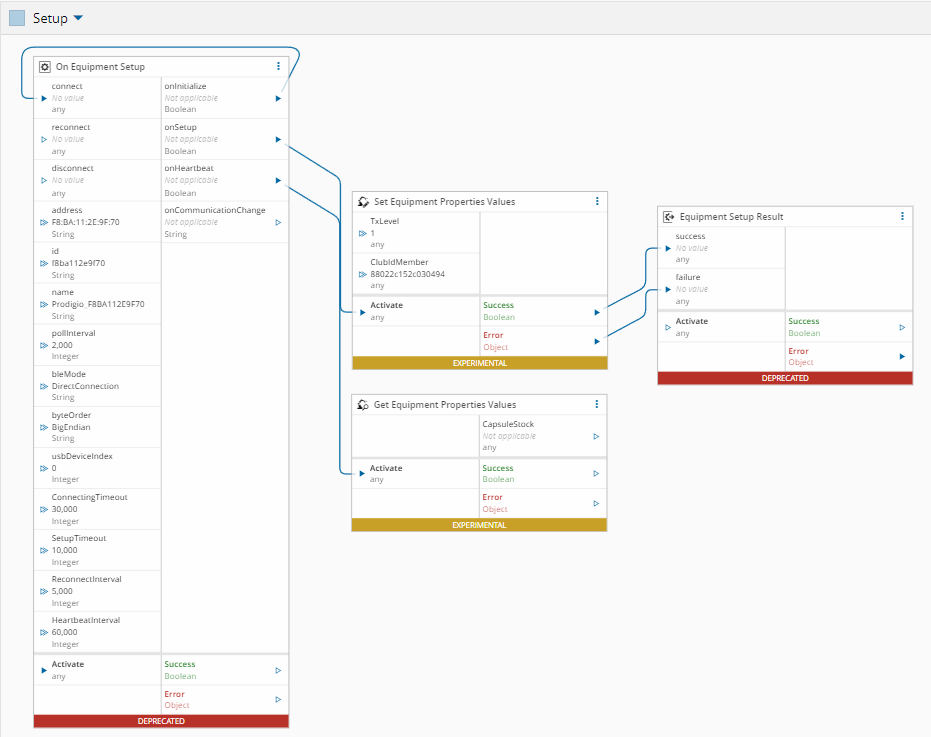
Before communication is enabled and fully bidirectional, the Bluetooth device Prodigio_F8BA112E9F70 must be paired with the computer.
Two BLE characteristics must be assigned specific values for MES to be allowed to read from and write to the equipment:
- TxLevel = 1
- ClubIdMember = 88022c152c030494
This configuration can be easily applied in the Controller Setup, during the OnSetup phase:
SEMI E10 State
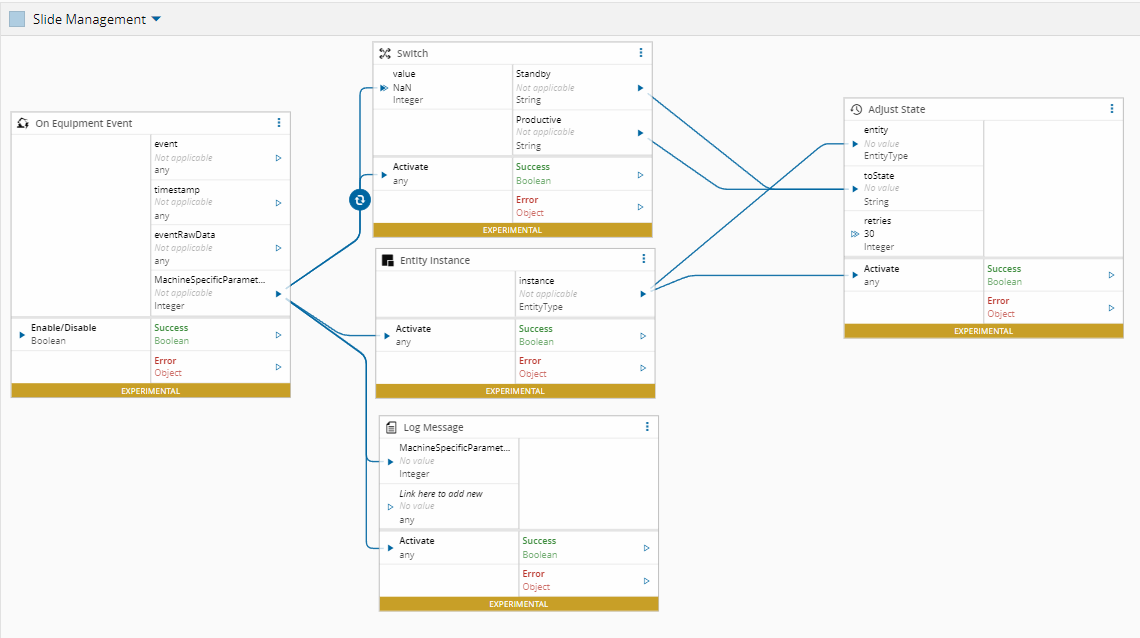
Manipulating the Slider in the machine, the Event OnSliderStateChange changes the Resource state, based on the SEMI E10 model of the equipment:
- Slide Open - Resource goes to Standby
- Slide Close- Resource goes to Productive
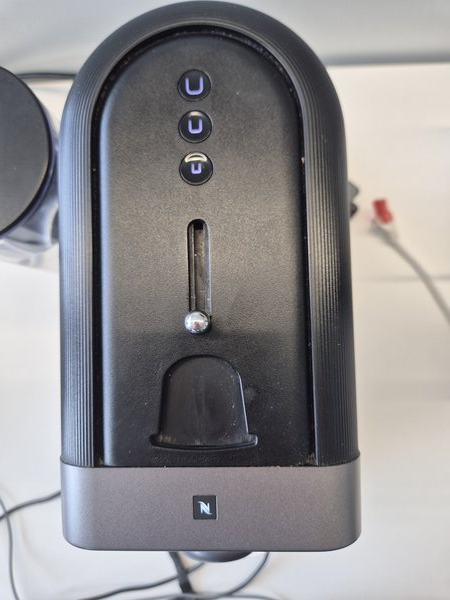
The MachineSpecificParameters property of the event, assumes 3 distinct values:
| Value | Slide |
|---|---|
| 0, 10 | Open |
| 2 | Close |
Some buffer operations are needed to implement this logic, namely:
- Applying a Logic AND 2
- Shift Right of 1
- Convert to Unsigned Integer
| Value | State |
|---|---|
| 0 | Equipment State to Standby |
| 1 | Equipment State to Productive |
Capsule Handling
The equipment is capable of reporting the number of capsules consumed and the CapsuleStock event is triggered whenever this value changes. However, this functionality was not implemented in this Proof of Concept. Instead, capsule stock is managed directly in MES, which provides a more robust and reliable approach.
Coffee Management
To brew a coffee, some logic on the MES side triggers the Action Group brew. This can be achieved using a DEE that will be executed in a button click for example with the CoffeeType as input. To trigger each of the following Coffee types, the corresponding code should be written in the BLE Characteristic of the Nespresso equipment:
| Type | Command Code |
|---|---|
| Lungo | 03050704000000000002 |
| Espresso | 03050704000000000001 |
| Ristretto | 03050704000000000000 |
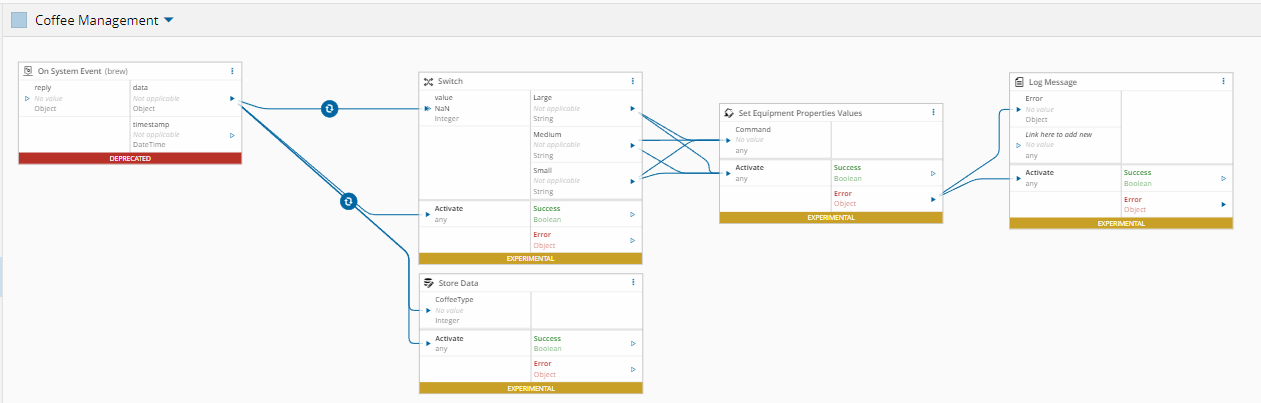
The response will trigger the OnCommandResponseChange event. The CommandResponse Event Property gives the status in buffer position (3,1):

| CommandResult | Status |
|---|---|
| 32 | Ok |
| 22 | Not Ok |
| 36 | Error |
In case of error, the bit (4,1) could be:
| Bit Value | Error Description |
|---|---|
| 1 | Invalid State |
| 8 | Slide is Open |
| 18 | Need to Insert a new Coffee capsule |
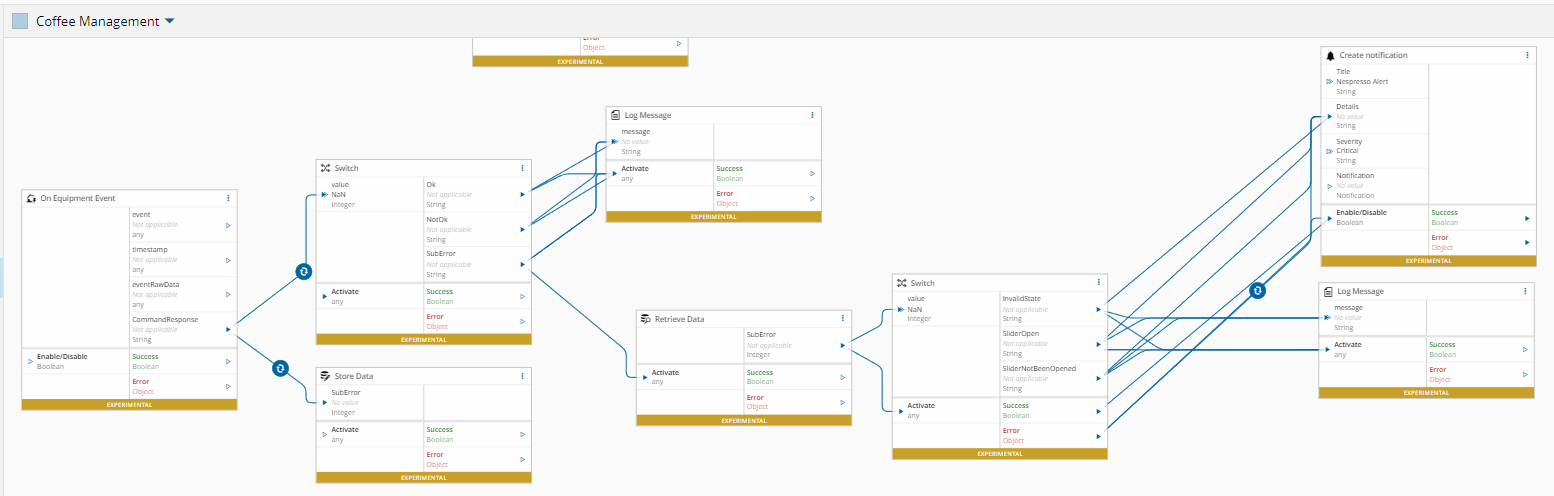
A notification is created with popup of the error.
Event Handling
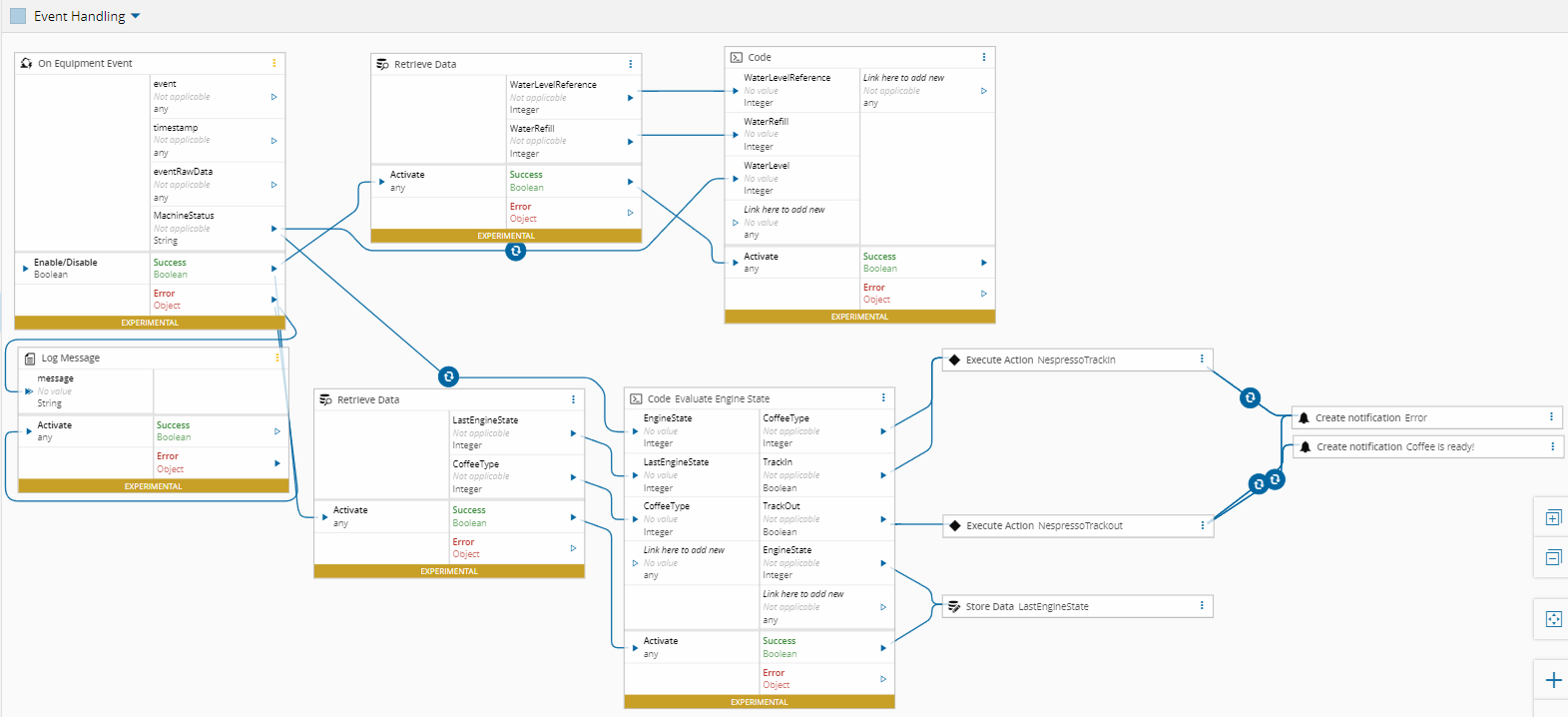
During the brew process the OnMachineStatusChange event is triggered, giving the status of the equipment:
The OnMachineStatusChange event exposes the machine state through buffer positions that indicate engine activity and water consumption levels.

| Buffer Position | Description |
|---|---|
| Bit 1 | Engine Status |
| Bits 6 and 7 | Water Level |
Engine State
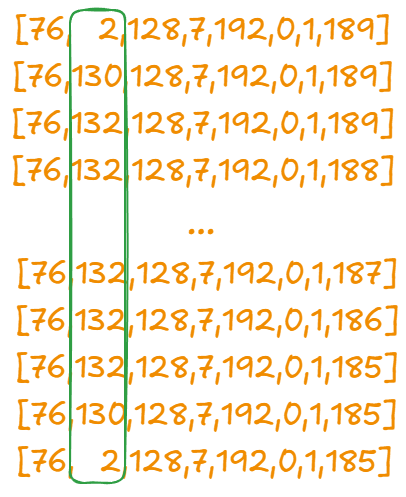
The buffer bits(1,1) give you the state of the engine during the brew:
| Engine State | Description |
|---|---|
| 2 | Idle |
| 132 | Starting/Stopping |
| 130 | Brewing coffee |
The Status commutes following this pattern:
State Transitions:
2 → 130: Idle to Starting130 → 132: Starting to Brewing132 → ...... → 132: Brewing continues132 → 130: Brewing to Stopping130 → 2: Stopping to Idle
The Material TrackIn and TrackOut are done in the following transitions:
130 → 132: TrackIn of material132 → 130or132 → 2: TrackOut of in-process material
Notifications in case of error are sent, as well as a notification of successful brewing.
Water Level
Bits 6 and 7 provide the Water Level. In fact, what the equipment provides is a counter for the descaling of the machine, meaning that when the countdown value reaches zero, the machine needs maintenance and decalcification. To calculate the water level, when the tank is refilled, a value in ml is persisted and for each decrement, an estimated value is subtracted, giving the real ml value at each moment.
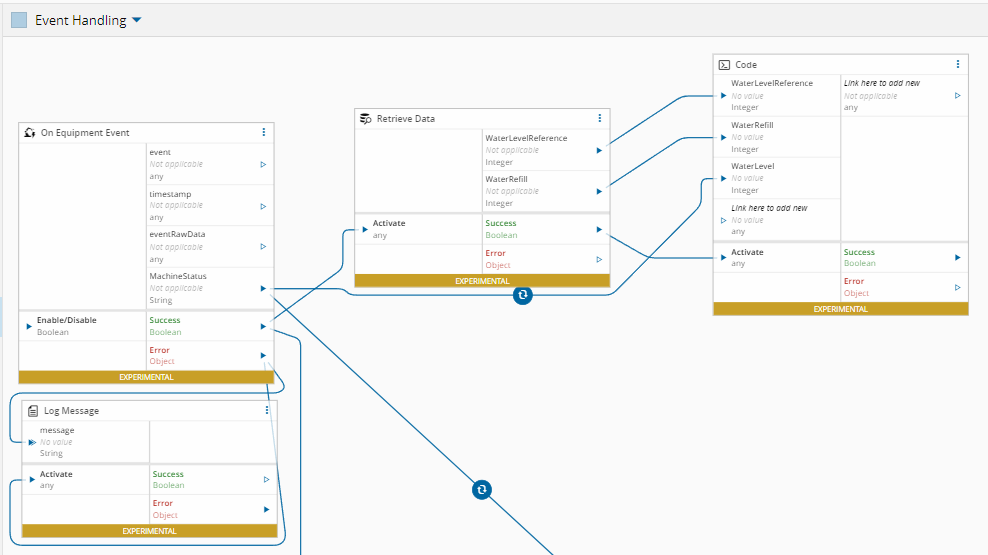
The calculated Water Level is then written to the Water level KPI.
Conclusion
A Nespresso machine brewing espresso is about as far from a factory floor as you can get, and yet, with ConnectIoT and Critical Manufacturing MES, it fits naturally into the same integration model used for industrial equipment.
The BLE communication layer handles the protocol specifics, the Controller workflows manage the machine lifecycle, and MES takes care of the rest: material tracking, resource state, and production records. The coffee machine becomes, effectively, just another resource on the shop floor.
The exercise has a practical point. If MES can track a capsule from the moment it drops into the machine to the moment it ends up in the bin, it can track anything. The same patterns, event-driven state transitions, material dispatch and trackout, water consumption as a production variable, apply directly to real manufacturing scenarios.
The Nespresso PoC is a useful demonstration precisely because it is simple enough, yet covers enough ground to validate the integration approach. Next time someone asks you what ConnectIoT can do, the answer might just be: “It can make a coffee”.
Author
Hello, my name is Rodrigo Cordeiro. I’m passionate about machine integration, automation and transforming industrial data into clear, useful, decision‑ready insights.
You can reach me on LinkedIn
Skills: ConnectIoT | Data Analyst | Data Scientist