But, what the heck is a deadlock ?
Imagine two queries walk into a bar.
One locks table A, the other locks table B.
Then they both want the other’s table.
SQL Server says: “You guys fight it out, I’ll pick one victim.”
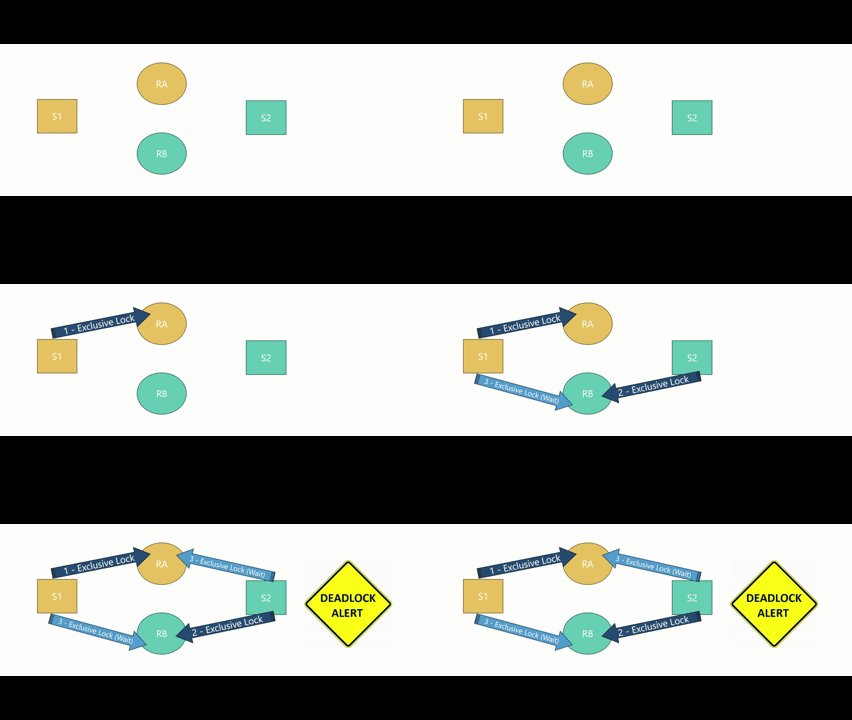
Another example: Material vs Resource
Service S1 locks Material M.Service S2 locks Resource R.Then, Service S1 tries to lock Resource R (already held by Service S2) and goes into a wait state. At the same time, Service S2 tries to lock Material M (already held by Service S1) and also enters a wait state.
➡️ Result: DEADLOCK! ⚠️
Deadlock resolution
SQL Server is designed to detect deadlocks and resolve them automatically by choosing one session as the deadlock victim and terminating it, allowing the other to continue.

In complex scenarios, multiple sessions can be locked in cascade, and SQL Server is smart enough to detect such cases and resolve them as well.
It chooses the session to kill based on two factors:
- deadlock priority, which you can set to LOW, NORMAL, HIGH, or a numeric value to tell SQL Server how important the session is
- rollback cost, which measures how much work SQL Server would need to undo if that session were terminated
The session with the lower priority is always chosen as the victim, and if both have the same priority, SQL Server kills the one with the lower rollback cost to recover more quickly.
Ways to Avoid Deadlocks
- Access objects in the same order
- If all your transactions lock tables in the same sequence (e.g. always Entity Type A → Entity Type B), you remove the “you first, no you first” scenario
- Keep transactions short and simple
- The less time locks are held, the lower the chance of blocking others
- Use the right indexes
- Missing or bad indexes cause SQL Server to scan huge chunks of data, locking more rows than necessary, which increases deadlock risk
- Handle deadlocks gracefully in code
- Even with precautions, deadlocks can still happen. Catching deadlock errors (error code 1205) and implementing a retry mechanism is advisable
Wrong Execution Plans
Deadlocks due to wrong execution plans usually happen when SQL Server chooses an execution plan that accesses resources in an unexpected order or uses an inefficient join strategy. To really understand the root cause of these deadlocks, we need to understand what are logical and physical joins.
Logical Joins - What to get
In SQL Server, logical joins describe the relationship between two sets of data (two tables, or a table and a result set) in terms of what rows should be returned. Think of it this way:
- A logical join answers the question “Which rows from Table A and Table B should appear in the result set?”
- Later, SQL Server’s physical join operators (Nested Loops, Merge Join, Hash Join) decide “How do we actually fetch and combine them?”
So logical joins define the what, physical joins define the how.

More information about SQL Joins
Physical Joins - Nested Loops
A Nested Loop Join is a physical join method in SQL Server. It works like a double loop in programming:
- For each row in the outer table, SQL Server searches for matching rows in the inner table.
Think of it like:
- “For each production order, find their materials.” You check every production order one-by-one, and for each one, scan or look up the materials that match.
How it works step-by-step
- Pick an outer table (usually the smaller table, or the one filtered first).
- Loop through each row of the outer table.
- For each outer row, search the inner table for matching rows (using an index seek if possible, otherwise a scan).
- Output the combined results.

When is it efficient?
- Outer table is small.
- Inner table has an index on the join column.
- Join returns few matches per outer row.
Example: If you join Production Orders (100 rows) to Materials (1 million rows) where only a few materials match each production order and there’s an index on Materials.ProductionOrderId, the Nested Loop join is very fast and locks the fewest rows possible.
When is it bad?
- Outer table is large and/or there’s no index → SQL Server must scan the inner table many times.
- Can lead to poor performance for large datasets.
Example: Joining two huge tables without indexes → Nested Loops becomes a performance nightmare.
Physical Joins - Merge
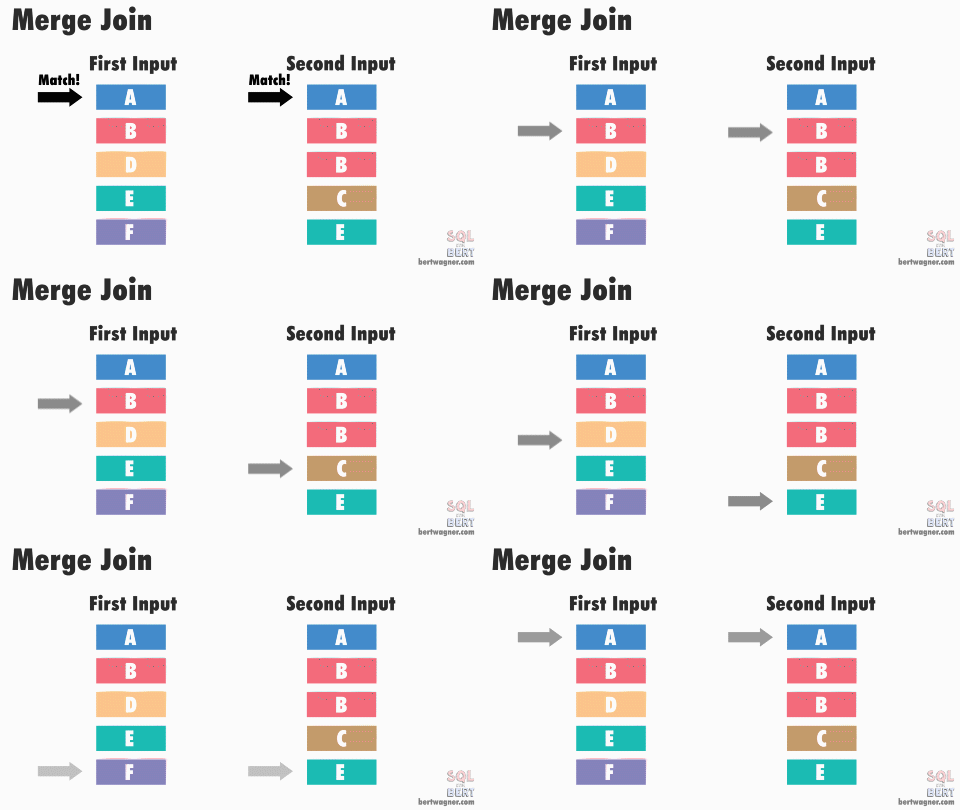
A Merge Join is a physical join method in SQL Server that works by sorting both input tables on the join key and then merging them together, much like merging two sorted lists.
Think of it like:
- “Line up both lists in order and walk through them together, matching rows as you go.”
This is very efficient for large datasets if both inputs are already sorted or can be sorted quickly.
How it works step-by-step
- Sort both input datasets on the join column (if they’re not already sorted).
- Open pointers at the start of both sorted lists.
- Compare the current rows from both lists.
- If they match: output the joined row and move both pointers forward.
- If one is smaller: advance that pointer.
- Repeat until one list is exhausted.
When is it efficient?
- Both inputs are already sorted on the join key (often thanks to indexes).
- Large datasets where sorting is cheap compared to scanning repeatedly.
- Joining large tables with range queries or ordered results.
Example: Joining ProductionOrder and Materials when both have indexes on ProductionOrderId.
When is it bad?
- if both inputs are unsorted and require expensive sorting first.
- Small datasets — Nested Loop is usually faster here.
- Tables with a lot of random access without good indexes
Example: Joining two huge tables without indexes → Nested Loops becomes a performance nightmare.
Physical Joins - Hash
A Hash Join is a physical join method in SQL Server designed for joining large, unsorted datasets without indexes.
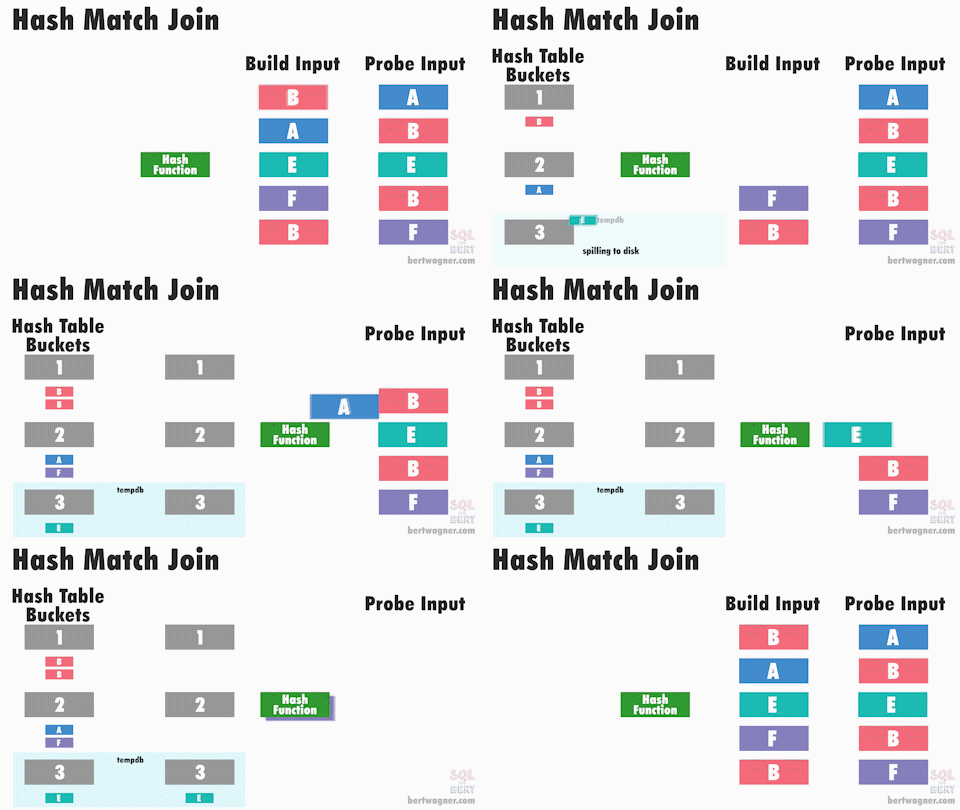
It works by building a hash table from one input (the build input) and then probing it with rows from the other input (the probe input).
Think of it like:
- “Create a fast-access lookup table for one dataset, then check every row in the other dataset against it.”
How it works step-by-step
- Build phase
- SQL Server chooses one of the input tables (usually the smaller one).
- It reads that table and creates a hash table in memory, where join keys point to matching rows.
- Probe phase
- SQL Server scans the other table (the probe input).
- For each row, it applies the same hash function and looks up matching rows in the hash table.
- Output matching rows.
When is it efficient?
- Large tables with no useful indexes on the join column.
- When join inputs are unsorted.
- When neither Nested Loops nor Merge Join would be efficient.
Example: Joining two large tables without indexes where sorting would be costly.
- Inner table has an index on the join column.
- Join returns few matches per outer row.
When is it bad?
- Small datasets: Nested Loops or Merge Joins usually work better.
- Requires enough memory and tempdb space for building the hash table, otherwise it spills to disk (slower).
- CPU-intensive due to hashing.
Example: Joining two huge tables without indexes → Nested Loops becomes a performance nightmare.
Real World Scenarios
Missing Indexes
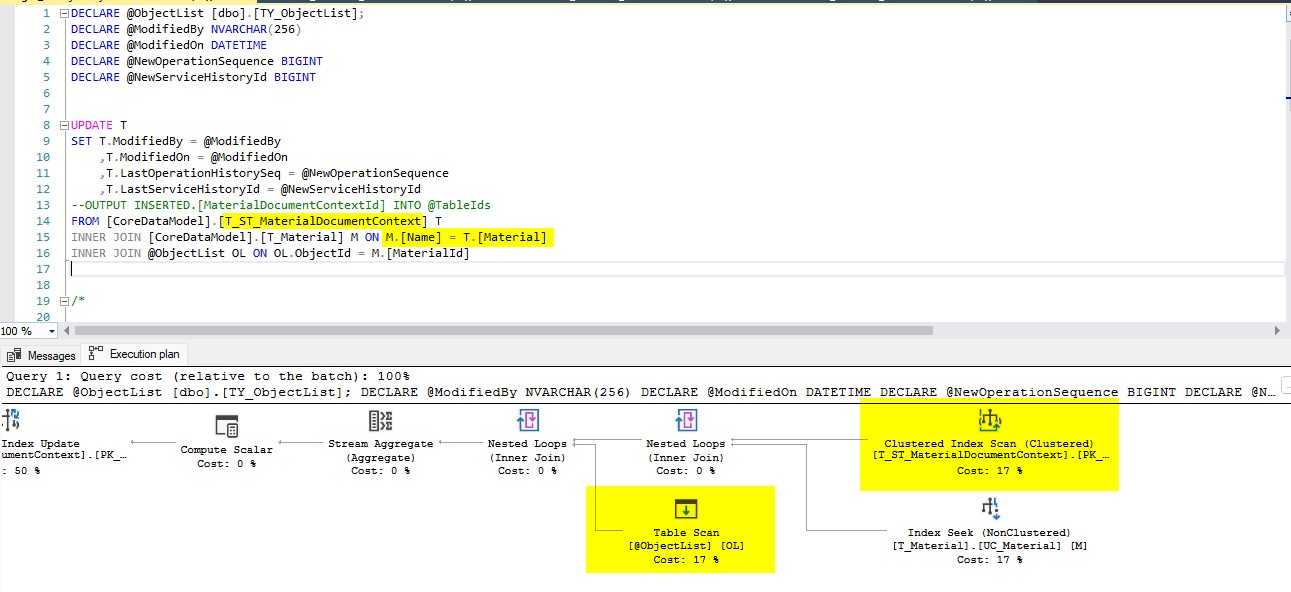
We had an incident when terminating materials. As you may know, CM automatically deletes rows in smart and generic tables that reference materials being terminated. However, because the material column in smart tables is sometimes not indexed, the execution plan chosen by the engine performs a join between all rows in the smart table and the material table, applying the @ObjectList filter only afterwards. During this process, many material rows were locked simultaneously, which led to contention and ultimately deadlocks in the system.
Preventive Actions
- Create a new index on the smart table Material Document Context by the Material column.
- Since the input @ObjectList receives MaterialIds, we should also enforce this table as the driving table. To achieve that, the FORCESEEK hint can be applied, which instructs the engine to use an index seek when joining with this table.
After Index and force seek hint

Foreign Keys
This incident occurred while updating a Map in CM. The Map entity has a foreign key referencing the Resource entity, which means that whenever SQL Server performs an insert or update, it enforces locks on the Resource entity. This ensures no other session can update or delete the referenced entity until the transaction is committed. It is debatable whether the foreign key is necessary, since the host application already enforces this integrity, but that’s a topic for another blog post. In this case, SQL Server, most likely due to stale table statistics, chose to use a Merge Join instead of a Nested Loops Join, resulting in a larger lock footprint, increased contention, and ultimately deadlocks.

Preventive Actions
- Initially the team performed a small change in the update procedure to enforce “loop joins”
- However, the same issue repeated on the next month, and therefore, the team decided to disable the foreign key resolving the issue on its root
Takeaway notes
Deadlocks happen when two sessions wait on each other’s locks — SQL Server resolves this by killing one “victim”
Consistent object access order is your first line of defense
Always lock tables in the same sequence across services to avoid circular waitsShort transactions = fewer locks held = fewer deadlocks
Keep them leanIndexes matter more than people think
Missing or poor indexes force scans, widen lock footprints, and trigger both blocking and deadlocksExecution plans can cause deadlocks
SQL Server may choose a Nested Loop, Merge, or Hash Join that accesses tables in an unexpected order or touches far more rows than requiredNested Loops are great for small, indexed lookups — but a disaster when the outer table is large or unindexed
Merge Joins shine when both inputs are sorted — but sorting large tables can be expensive and increase locking
Hash Joins help with unsorted, large datasets, but require memory; spills hurt performance and widen lock ranges
Wrong plan due to missing indexes
SQL Server can decide to join full tables before applying filters, locking many more rows than expected → index +FORCESEEKhint can be used to avoid itWrong plan amplified by foreign keys
FK enforcement can trigger Merge Joins which increases the number of rows locked → enforcing Loop Joins can help; removing the FK eliminates the root causeAlways handle deadlock error
1205in code
Retries are a fact of life in high-concurrency systems. In CM, you can leverage the existing Retry Mechanism to cope with deadlocksIf you see recurring deadlocks, don’t guess
- Check the deadlock graph
- Look for missing indexes
- Verify join order
- Inspect execution plans
- Question whether constraints or queries are forcing bad access patterns
Author
I work in the Solution Delivery department as a Technical Architect. Passionate about building scalable solutions and performance optimization.
You can check me at LinkedIn
